

If you’ve recently noticed a sudden spike in direct traffic from China (Lanzhou) to your website, you’re not alone—and it might be puzzling. Why are so many visitors coming from a location you don’t normally see? Is it a cause for excitement or concern?
In this post, we’ll break down what sudden direct traffic from China usually means, common causes, and practical steps you can take to analyze and respond to it. Whether you’re a business owner, marketer, or website manager, this guide will help you understand what’s happening behind the scenes.
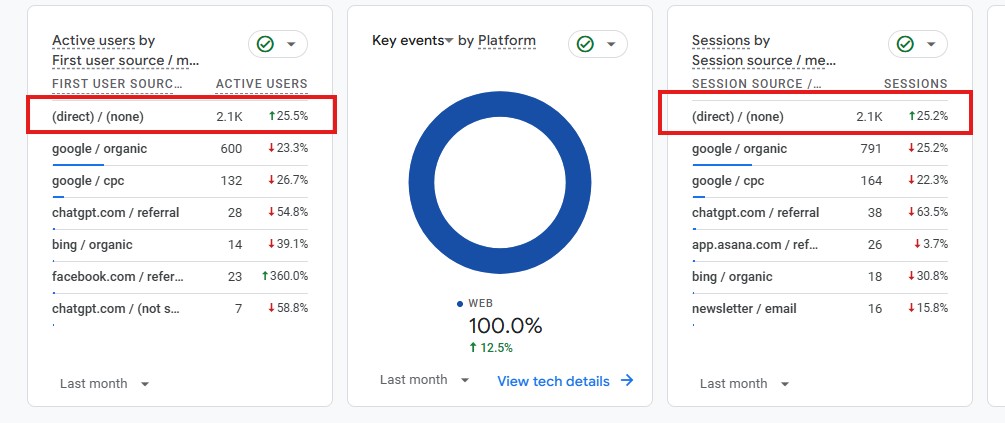
What Is Direct Traffic?
Direct traffic refers to website visits where no referral source is recorded by your analytics platform. In practical terms, it means someone reached your website without coming from a search engine, social media platform, paid ad, or another website link.
For many websites, direct traffic happens when a visitor types your website URL directly into their browser, uses a saved bookmark, or clicks a link from a source that doesn’t pass tracking data—such as a PDF, desktop app, or certain email clients. In these cases, analytics tools like Google Analytics label the visit as “direct” because there is no identifiable referrer attached to the session.
However, direct traffic isn’t always as straightforward as it sounds. It can also include visits where referral information is lost due to privacy settings, browser restrictions, HTTPS to HTTP transitions, ad blockers, or tracking misconfigurations. Because of this, direct traffic often becomes a “catch-all” category for visits that analytics tools cannot properly attribute.
For website owners, understanding direct traffic is important because it reflects a mix of true brand-driven visits and unattributed website traffic. A healthy level of direct traffic can indicate strong brand recognition, returning visitors, or offline marketing success. On the other hand, sudden spikes in direct traffic—especially from unexpected locations—may signal bot activity, tracking errors, or spam traffic that needs further investigation.
Why Am I Seeing Sudden Direct Traffic From China?
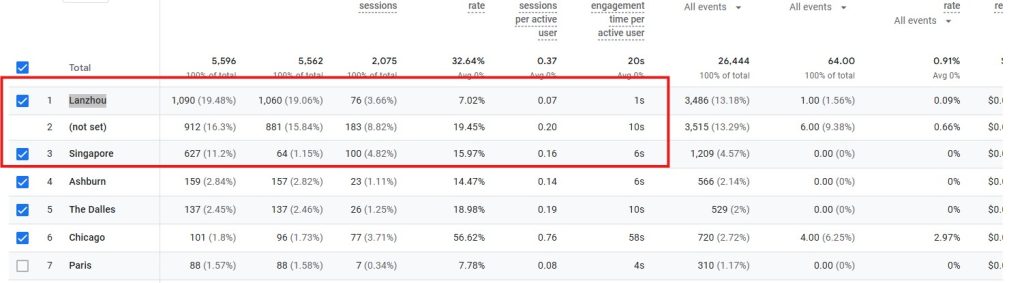
Seeing a sudden spike in direct traffic from Lanzhou, China can be confusing—especially if you don’t operate internationally or target that market. In most cases, this type of traffic is not coming from real prospective customers, but from technical, automated, or tracking-related sources.
Below are the most common and legitimate explanations, along with how to evaluate what’s actually happening.
Bot or Automated Traffic (Most Common Cause)
One of the most frequent reasons for unexpected direct traffic from China is bot activity. Many automated programs operate from large data centers or cloud servers, and China-based IP ranges are commonly used for:
- Content scraping
- Website vulnerability scanning
- SEO data collection
- Automated testing or crawling
These bots typically bypass referral tracking, which causes them to show up as direct traffic in analytics tools.
How to identify bot traffic:
- Very high session volume with extremely short visit durations
- Little to no interaction (no scrolling, clicks, or navigation)
- Repeated hits to the same page or endpoint
- Traffic spikes during unusual hours relative to your audience
- 100% bounce rate or near-zero engagement
This traffic inflates numbers but does not represent real user interest or demand.
Proxy, VPN, or Masked User Traffic
Some legitimate users access websites through VPNs, corporate proxies, or privacy tools that route traffic through international servers—including China.
This can occur when:
- Employees work remotely using secure VPNs
- International partners or contractors access your site
- Users rely on privacy-focused browsers or network tools
In these cases, the geographic location reflects the server, not the actual user. Because many VPNs strip referral data, these visits often appear as direct traffic.
While this traffic is real, it’s usually:
- Low in volume
- Inconsistent
- Not tied to conversions
Referral Spam or Tracking Attribution Issues
Another common cause is misattributed traffic due to analytics limitations or configuration errors.
This can happen when:
- Referral data is intentionally spoofed
- Tracking parameters are stripped during redirects
- HTTPS → HTTP transitions remove referrer information
- Tag manager or analytics scripts fire incorrectly
When attribution data is lost, analytics platforms default to classifying the session as direct traffic, even though it originated elsewhere.
Crawlers Triggered by AI or Indexing Systems
Some newer crawlers—particularly those used for AI training, data extraction, or search evaluation—don’t always identify themselves clearly. These crawlers may:
- Access pages directly without referrer headers
- Rotate IP addresses globally
- Mimic human behavior more closely than traditional bots
This can result in traffic appearing as direct visits from unexpected regions.
Sudden direct traffic from Lanzhou, China is rarely a sign of real user interest. It’s usually the result of bots, proxies, VPN routing, or tracking attribution issues. Understanding this prevents unnecessary panic and helps you focus on meaningful traffic signals that actually impact growth and conversions.
Is Direct Traffic From China or Singapore a Problem?
Seeing sudden spikes in direct traffic from countries like China or Singapore can be surprising—especially if your business doesn’t operate internationally. While it’s natural to worry, this type of traffic is very common and not automatically a cause for concern.
In most cases, this activity is not real user behavior and does not indicate growing interest from overseas audiences.

How to Exclude Traffic From China and Singapore in GA4 Reports (Safely)
This checklist helps you clean reports without breaking your data. It follows GA4 best practices and avoids destructive filters.
The key is to analyze behavior first, then apply the right controls.
Step 1: Confirm the Traffic Is Low Quality
Before excluding anything, verify behavior.
In GA4, check:
Engagement time under 5 seconds
One page view per session
No scroll, click, or form events
No conversions
If traffic shows these patterns, it’s almost always automated or proxy-based.
Step 2: Create a Comparison (Do NOT Filter Data)
This is the safest and recommended method.
Go to Reports
Open Traffic acquisition or Pages and screens
Click Add comparison
Set:
Dimension: Country
Condition: does not exactly match
Value: China
Apply
✔ Raw data stays intact
✔ Reports become clean
✔ Easy to remove later
Step 3: Build a “Clean Traffic” Exploration (Recommended)
This gives you a saved view for SEO and performance analysis.
Steps
Go to Explore
Start a Blank Exploration
In Variables, click + next to Segments
Create a Session Segment
Add conditions:
Country does not exactly match China
Country does not exactly match Singapore
(OR use “does not match regex” withChina|Singapore)
Apply the segment
Best use cases
Clean SEO reporting
Conversion analysis
Bot behavior analysis
Client reporting
📌 This does not affect GA4 data collection.
Step 4: Validate That SEO Traffic Is Real
Inside your clean view, confirm:
Organic Search engagement stays stable
CTR and conversions remain consistent
Direct traffic drops more than Organic
If SEO numbers stay strong, your rankings and visibility are legitimate.
Step 5: Review Server or Security Logs (Optional)
If traffic volume is high or persistent:
Check server logs for repeated IPs
Look for generic user agents
Identify rapid request patterns
This confirms automation beyond GA4.
Step 6: Block Bots Before They Reach GA4 (Advanced)
If needed, handle this outside GA4:
Options include:
Firewall rules
Bot protection services
Rate limiting
Geo-based blocking (carefully)
⚠️ Only do this if traffic is clearly non-human.
What NOT to Do in GA4
Do NOT use Data Filters for countries
Do NOT look for a “bot exclusion” toggle (it doesn’t exist)
Do NOT delete historical data
Do NOT filter traffic without confirming behavior
GA4 filters are destructive and permanent.
How Proceed Innovative Helps You Clean Up and Understand Your Website Traffic
If sudden spikes in direct traffic have you second-guessing your analytics, you’re not alone, and you don’t have to figure it out on your own. Our team helps businesses audit their Google Analytics setup, identify bot and automated traffic, correct misattributed sessions, and build clean, reliable reporting you can actually trust for marketing decisions.
Through our Web Analytics Consulting services, we make sure the data behind your SEO and marketing strategy reflects real visitors, not noise, so every decision you make is based on what’s actually happening on your site.
About the Author: Patrick Panayotov