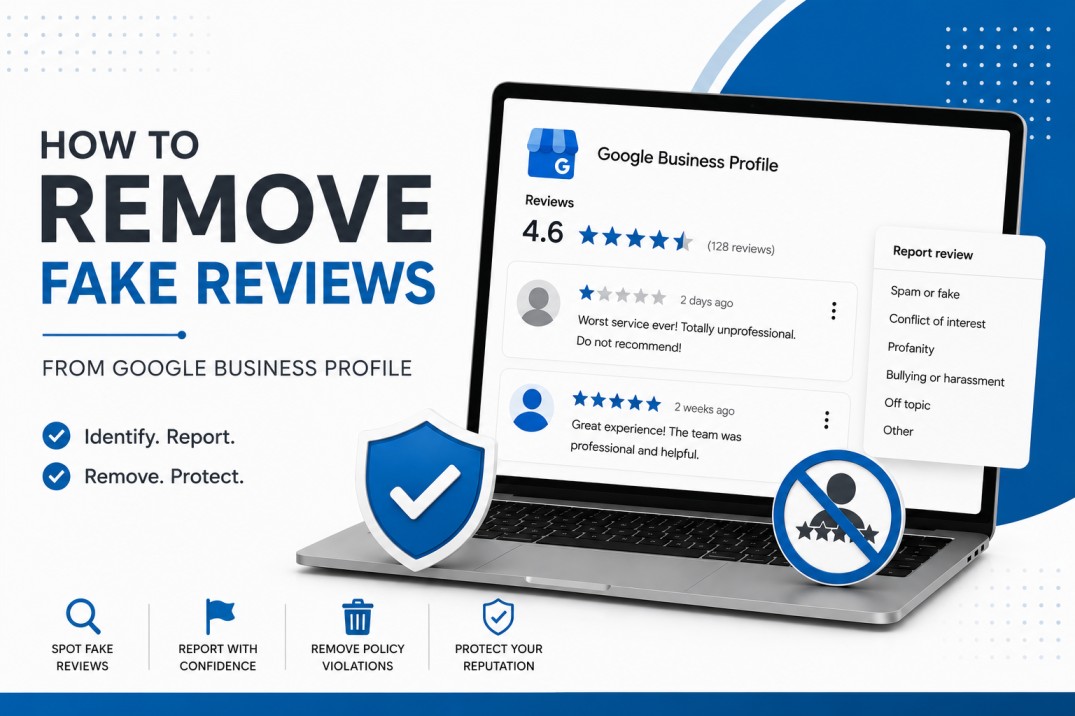
Fake Google reviews can often be removed if they violate Google’s review policies, such as spam, fake engagement, harassment, or conflicts of interest. Business owners can flag reviews through Google Maps, Google Business Profile, and the Review Management Tool.
This step-by-step guide shows business owners exactly how to identify, flag, and remove fake Google reviews — and what to do when Google won’t take them down.
Why fake reviews are a serious problem
A single fake review may not seem significant at first, but multiple fraudulent reviews can affect a business in several ways.
Damage to Customer Trust
Potential customers often make quick decisions based on ratings and reviews. Seeing suspicious one-star reviews can reduce trust before someone even visits your website.
Lower Local SEO Performance
Google reviews influence local map rankings and visibility. A pattern of negative fake reviews can weaken click-through rates and engagement signals that affect local SEO.
Lost Leads and Revenue
Consumers frequently compare ratings before contacting businesses. Fake reviews can discourage potential customers from reaching out.
Emotional Stress for Business Owners
For many business owners, fake reviews feel personal. They can create frustration, anxiety, and concern over long-term brand reputation.
How to Identify a Fake Review
Not every bad review is fake. A 1-star review from an unhappy customer is real feedback — and Google won’t remove it. Before you flag anything, run through these 4 checks first.
No real profile behind it
Real customers usually have a profile history — past reviews, a photo, an active account. Fake reviewers often don’t.
They were never your customer
Check your CRM, booking system, or invoices. If there’s no trace of this person ever contacting or visiting you, that’s a strong signal.
Vague with no real details
Genuine customers mention something specific — a caregiver’s name, a date, a service. Fake reviews are deliberately vague so they can’t be disproved.
Suspicious timing or pattern
One bad review can happen to anyone. Three 1-star reviews in two days, all from new accounts, is a coordinated attack — not a coincidence.
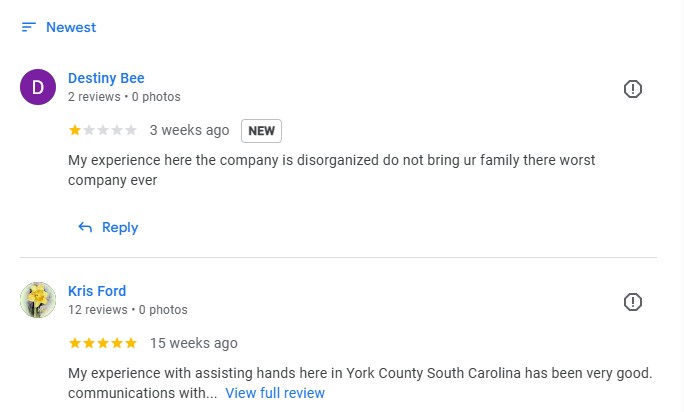
Here’s an example of what a fake vs real review looks like:
How to Report Fake Reviews to Google – Step by Step Guide
The quickest way to report a fake review directly from Google Maps:
Step 1 — Search your business on Google
Open Google Maps or Google Search and find your Business Profile listing.
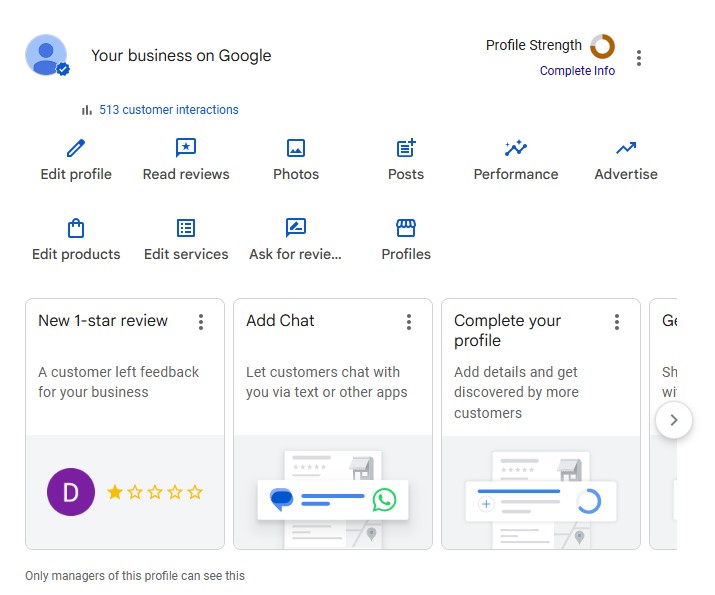
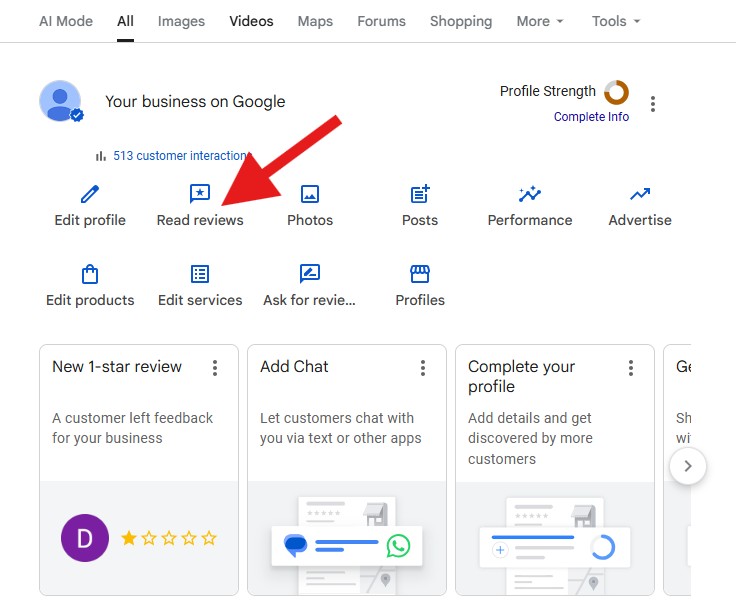
Step 2 — Click “Reviews” tab
Scroll to the reviews section in your business panel and click to see all reviews.
Step 3 — Click the 3-dot menu on the review
Each review has a ⋮ icon (three dots) in the top right corner. Click it to open options.
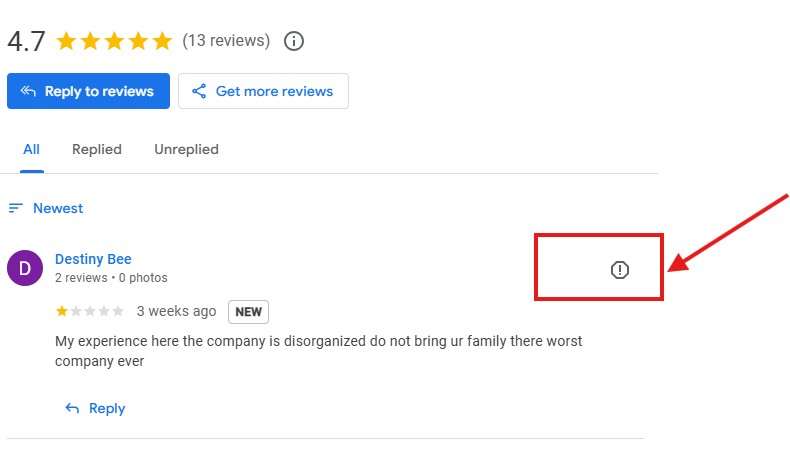
Step 4 — Select “Report review”
A dialog will appear. Choose the reason that best matches the violation.
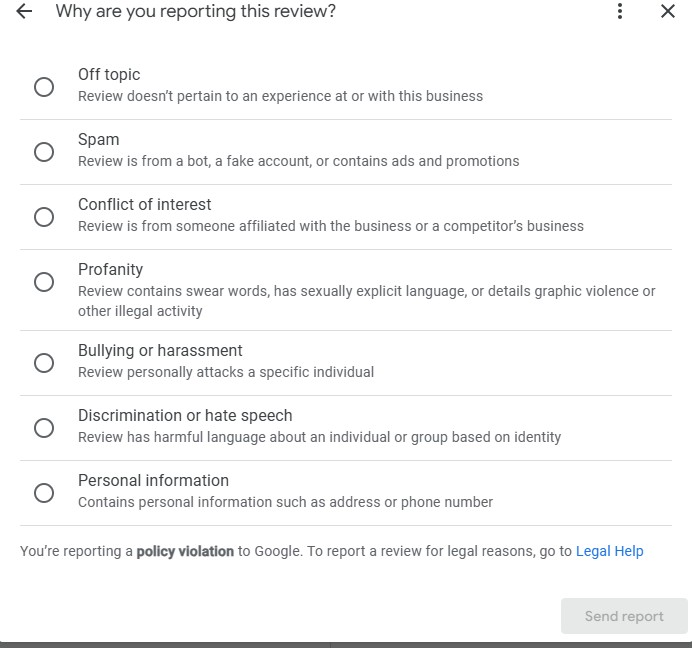
Which option should you pick for a fake review?
In most cases, select “Spam” — it’s the most accurate category for fake reviews posted by bots, fake accounts, or people who were never your customer.
Here’s a quick guide to help you choose the right one:
Not sure which one to pick? Ask yourself:
- Was it clearly never a real customer? → Spam
- Did a competitor or ex-employee post it? → Conflict of interest
- Does it contain swearing or threats? → Profanity
- Is it attacking a specific staff member? → Bullying or harassment
- Does it have nothing to do with your business? → Off topic
Once you select the reason, hit “Send report” at the bottom right. Google will review your report within 3–7 business days.
One important thing to remember:
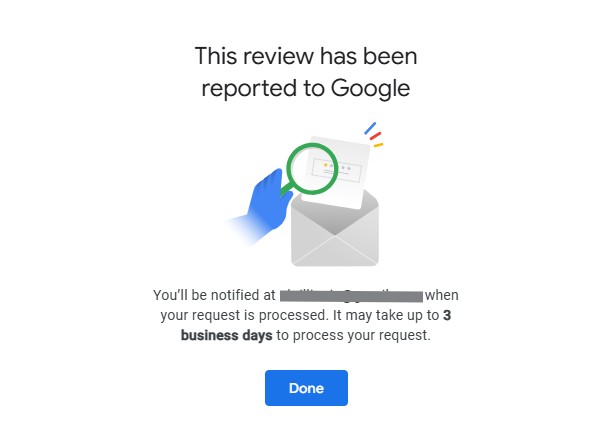
Google does not notify you when a decision is made. You’ll need to check back on the review manually to see if it has been removed. If it’s still there after 7 days, don’t give up — you can escalate the case directly through Google Business Support, which we’ll cover in the next section.
Step 5 — Submit and wait
Google typically reviews flagged content within 3–7 business days. You will not receive a direct notification.
Fake Review vs. Real Review: Quick Comparison
Common Mistakes Businesses Make When Reporting Fake Reviews
Many businesses unintentionally reduce their chances of removal by making avoidable mistakes.
One common issue is reporting legitimate negative reviews simply because the feedback feels unfair. Google allows honest customer opinions, even when they are critical.
Another mistake is responding emotionally or aggressively. Public arguments often damage trust with future customers.
Businesses should also avoid vague appeals without evidence. Documentation, screenshots, appointment records, invoices, and proof that the reviewer was never a customer can strengthen a removal request.
How Long Does Google Take to Remove Fake Reviews?
There is no guaranteed timeline.
Some reviews may disappear within a few days, while others may take several weeks if Google performs a more detailed investigation.
Typical process:
- Review flagged
- Google policy review
- Additional appeal if needed
- Final decision
If Google determines the review violates policy, it may be removed from public view.
Escalate using the review management tool
If flagging doesn’t work, use Google’s dedicated escalation tool:
Direct link: business.google.com/reviews — Use the “Review Management Tool” to submit a more formal complaint with additional context and evidence.
Visit; https://support.google.com/business/workflow/9945796?hl=en
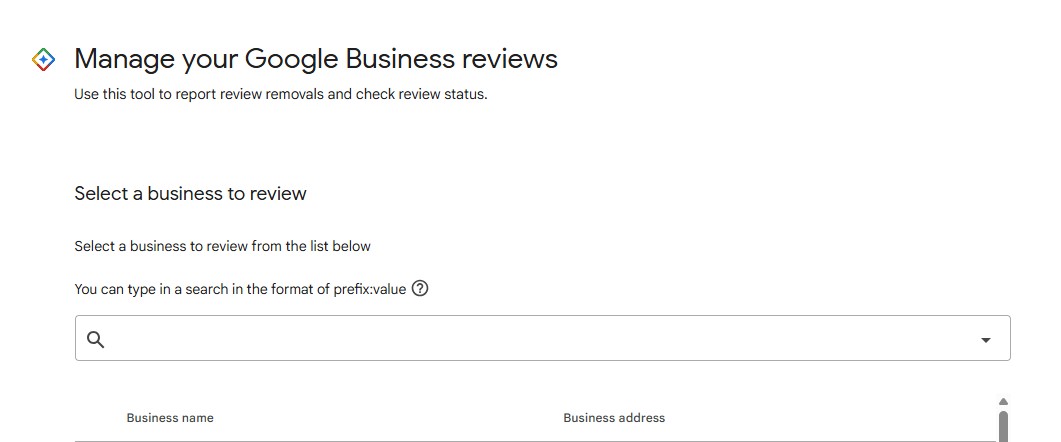
Step 2: Use this tool to report review removals and check review status.
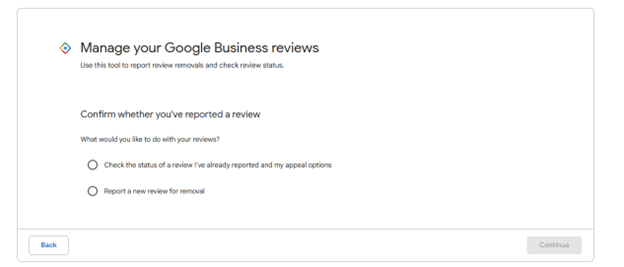
Step 3 — Check the status of your reported review
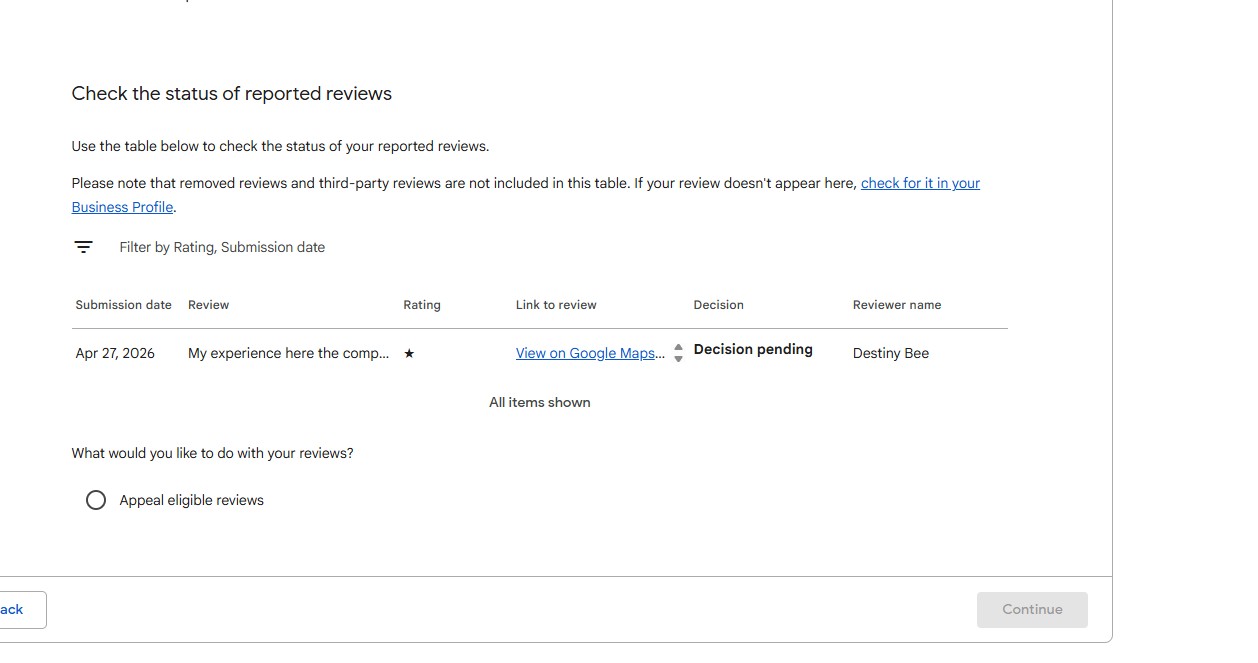
After you submit your report, Google gives you a way to track what’s happening with it. To check the status, go to your Google Business Profile, click on “Reviews,” then look for the review management or reported reviews section. This is what it looks like:
Here’s what each status means:
- Decision pending — Google is still reviewing your report. Give it 3–7 business days.
- Reviewed — No action taken — Google looked at it but didn’t find a policy violation. You can appeal this.
- Removed — The review has been taken down successfully.
Step 4 — Appeal if Google didn’t remove it
If Google reviewed your report and took no action, don’t give up. You have one more option — filing a formal appeal. Google’s review management tool lets you select up to 10 reviews and submit them for a second look. Here’s what the appeal screen looks like:
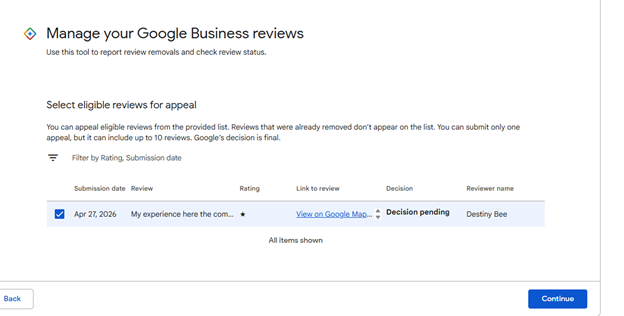
How the appeal works
Check the box next to the review you want to appeal — just like you can see “Destiny Bee’s” review is selected above — then hit “Continue” to submit your appeal.
A few things to know before you appeal:
- You only get one appeal — so make it count. Don’t appeal just because you’re frustrated. Only appeal if you have a genuine reason, like proof the person was never your customer.
- Up to 10 reviews can be included in a single appeal — useful if you were hit with multiple fake reviews at once.
- Google’s decision is final — if they reject the appeal, there is no further escalation within this tool. At that point your options are Google Support, the Help Community, or a legal route.
- Already removed reviews won’t appear in this list — only active reviews that are still live on your profile show up here.
What to do if the removal appeal is rejected
Getting a rejection from Google can feel frustrating — especially when you know the review is fake. But this isn’t the end of the road. Here are your next steps, in order:
Option 1 — Contact Google Business Support directly
This is your first move after a failed appeal. Instead of using the automated flagging tool, you’re now talking to a real person.
Here’s how to reach them:
- Go to support.google.com/business
- Click “Contact us”
- Select “Manage reviews” then “Report a review”
- Choose live chat or request a callback
When you contact support, have this ready:
- The direct URL of the fake review
- Screenshots of the review
- Proof the reviewer was never your customer (booking records, CRM screenshot, transaction history)
- A clear explanation of why it violates Google’s policy
Option 2 — Post in the Google Business Help Community
If support doesn’t resolve it, try the Google Business Help Community at support.google.com/business/community
Option 3 — Respond publicly and professionally
While you continue fighting for removal, always respond to the fake review on your profile. Future customers read your response just as much as the review itself.
Keep it calm and factual. Something like:
“We take all feedback seriously, however we have no record of this person visiting or using our services. We’d welcome the opportunity to discuss this directly — please contact us at [your number].”
This tells potential customers the review may not be genuine — without you having to say it directly.
Option 4 — Build up real reviews to dilute the fake one
This is the most powerful long-term strategy. One fake 1-star review hurts a lot less when you have 50 genuine 5-star reviews sitting above it.
After every completed service or appointment, send a simple follow-up message asking satisfied customers to share their experience on Google. Even getting 5–10 new real reviews can push your overall rating back up and push the fake review further down where fewer people see it.
Option 5 — Legal route for serious cases
If the review is provably false, damaging to your business, and Google has refused to act — you may have legal options.
A solicitor or attorney can send a formal cease and desist letter or file a defamation claim. This is typically a last resort, but Google does respond to legal notices, especially when the content is clearly defamatory.
This route makes most sense when:
- The review makes specific false claims about your business
- You can identify who posted it
- The financial damage to your business is significant
How to Protect Your Google Business Profile from Future Fake Reviews
While fake reviews cannot always be prevented completely, businesses can reduce risk by maintaining an active and trusted online presence.
Encourage Real Customer Reviews
Consistent authentic reviews help strengthen credibility and dilute suspicious activity.
Monitor Reviews Frequently
Early detection allows faster reporting and response.
Improve Customer Communication
Clear communication reduces misunderstandings that sometimes lead to disputes.
Use Reputation Management Tools
Monitoring tools can alert businesses when new reviews appear.
Maintain Accurate Business Information
An optimized and trustworthy Google Business Profile improves overall credibility.
Final Thoughts
Fake Google reviews can feel frustrating and unfair, especially for businesses that work hard to provide quality service. However, understanding Google’s policies, documenting suspicious activity, and responding professionally can improve the chances of protecting your online reputation.
The key is staying proactive. Businesses that monitor reviews regularly, encourage authentic customer feedback, and maintain a strong Google Business Profile are often more resilient against fraudulent review attacks.
As Google continues refining its spam detection systems, businesses that focus on transparency, trust, and customer experience will remain in the strongest position online.
About the Author: Diana Cankov