Geo-targeting in search engine optimization is the practice of optimizing your website, content, and local signals so your business appears in organic and map results for people searching within a specific location. It is how a service business earns visibility in the places it actually serves instead of competing nationally for terms that bring no work through the door.
Where someone searches from now shapes what they see. Two people typing the same three words into Google from different suburbs can get two different sets of results, and for a service business, that changes everything. If you install furnaces, handle water damage, or represent injury clients, ranking for “furnace repair” in the abstract does nothing for you. You need to rank where your trucks go. Generic terms put you in a national fight you cannot win and do not want. Location signals put you in front of the handful of people down the road who are ready to call.
This is not a niche concern. Across the local service accounts we manage, roughly 43% of the queries showing up in Google Business Profile insights include a city name, a neighborhood, or a “near me” modifier. Location is not a segment of local search. It is most of it.
This guide covers what geo-targeting is, how Google decides which location a search belongs to, how to build location pages that help rather than hurt you, the schema most sites leave out, how to measure whether any of it is working, and the mistakes that quietly cap your visibility.
What Is Geo-Targeting in SEO?
Geo-targeting in SEO is the work of earning search visibility for a specific place, so that when someone in your service area looks for what you offer, your business is one of the results they see.
Most articles stop at “add your city to your keywords.” The mechanics are more interesting than that. Google infers the location behind a search from three things, and good geo-targeting speaks to all three:
- The words in the query: When someone types “roofer in Aurora,” the intent is explicit. The city is right there in the search.
- The searcher’s actual location: Google knows roughly where the person is. Search “roofer” with no city attached from a phone in Aurora, and Google fills in the location for you.
- Implicit local intent: Some searches are local even when no city and no “near me” appear. “Emergency plumber” or “urgent care” are assumed to be local because the need is immediate and physical. Google treats them accordingly.
Geo-targeting in SEO is about earning organic and map visibility for a place through content, structure, and trust signals. That is a different thing from Google Ads location targeting, where you set a radius and pay for each click inside it. Both are useful. This article is about the organic side, which compounds over time instead of stopping the moment you pause the budget.
Here is the difference in practice. A home care agency that publishes one page for “home care” is competing with every agency in the country and speaking to no one in particular. The same agency with a page built around “in-home care in Naperville,” complete with its local caregivers, the neighborhoods it covers, and the nearby facilities it works with, is a far more relevant answer for a Naperville family, and Google can see why.
Geo-Targeting vs. Local SEO vs. Geofencing vs. Geotargeted Keywords
These terms get used interchangeably, and they shouldn’t be. They describe related but distinct things and mixing them up leads to muddled strategy.
| Term | What it is | Paid or organic | Scope |
| Geo-targeting (SEO) | Optimizing pages and signals to rank in a specific location | Organic | A component of local SEO |
| Local SEO | The full discipline of ranking a local business: website, Google Business Profile, reviews, citations, map pack | Organic | The umbrella that contains geo-targeting |
| Geofencing | Drawing a virtual boundary around a physical area and serving ads to devices inside it | Paid | An advertising tactic, not SEO |
| Geotargeted keywords | Search terms that name or imply a location, like "HVAC repair Schaumburg" or "near me" queries | Either | The keyword layer within geo-targeting |
The short version: geo-targeting is a part of local SEO, not another name for it. Local SEO is the whole engine. Geo-targeting is the piece of that engine focused specifically on winning a place. And despite the overlapping letters, geo-targeting has nothing to do with generative engine optimization. More on that further down.
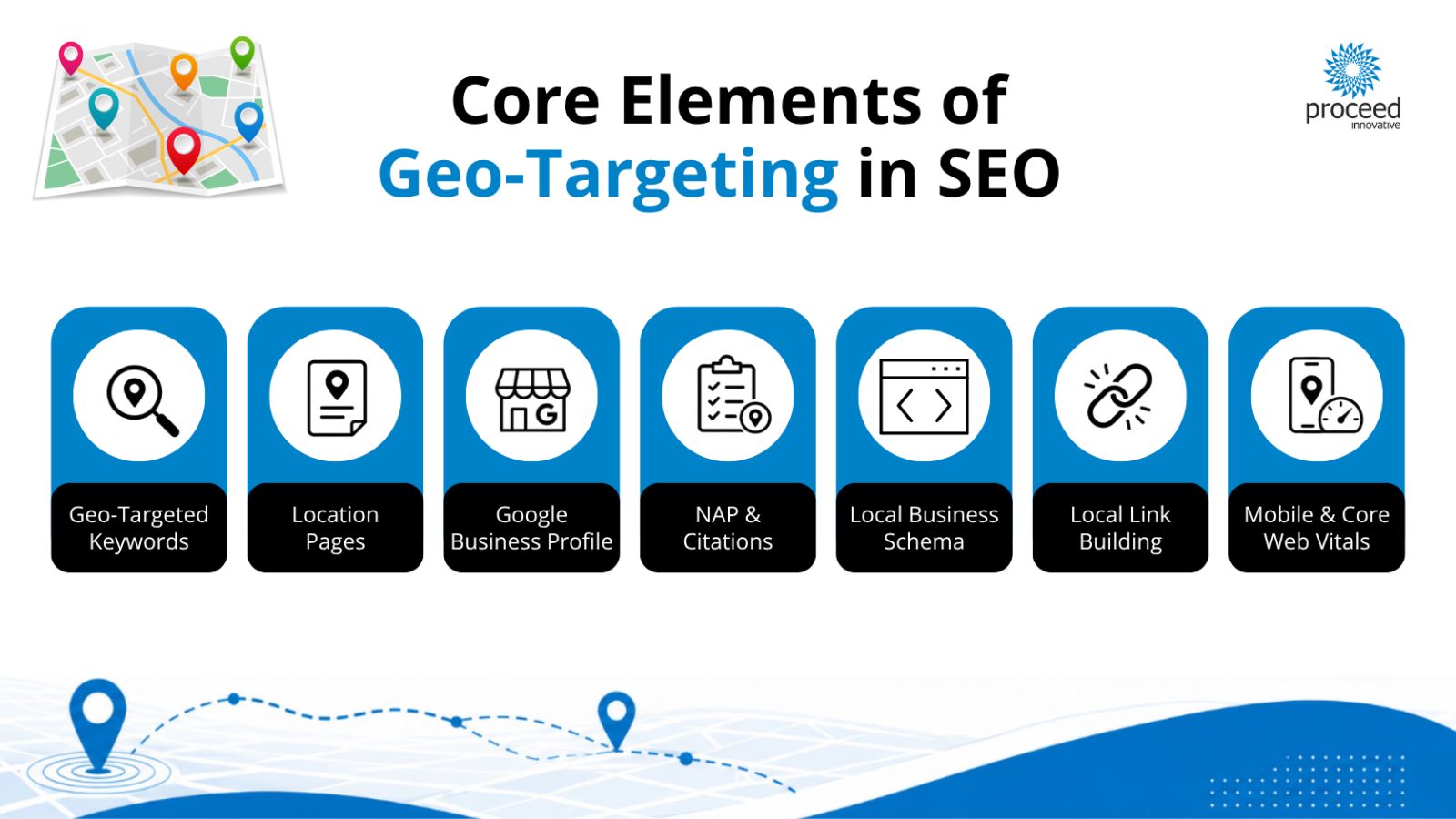
The Core Elements of Geo-Targeting in SEO
Strong geo-targeting is built from several parts working together, which is how our local SEO services are structured. Here is what each part does.
Geotargeted Keyword Research
Do not just bolt a city name onto a keyword and call it research. Real markets behave differently, and the terms people use in one region rarely match another. Research fresh for each market and pay attention to intent tiers: city-plus-service terms (“water damage restoration Batavia”), “near me” searches, and neighborhood-level phrases that only locals use.
Pull candidates from tools like Ahrefs or Semrush, then cross-check them against the search terms already showing up in your Google Business Profile insights. Those GBP terms are real queries from real people near you, which makes them some of the most honest keyword data you will find.
Location and Service Area Pages
These are the on-site backbones of geo-targeting. One page per genuine service area, each one useful in its own right. Building these correctly is where most sites go wrong, so there is a full walkthrough further down this page.
Google Business Profile
For a local business, the Google Business Profile is the single biggest ranking lever you have. Get the categories right, define your service areas accurately, use GBP products and posts, and keep reviews coming in. A complete, accurate profile is what earns you a spot in the map pack, and the map pack is often the first thing a local searcher sees. This is why Google Business Profile optimization is rarely optional for a service business.
NAP Consistency and Citations
Your name, address, and phone number should be identical everywhere they appear, on your site and across every directory. “Suite 100” in one place and “Ste. 100” in another is the kind of small inconsistency that quietly suppresses rankings, because it makes Google less certain your business is who and where it says it is.
Local Schema Markup
Structured data tells search engines exactly where you operate and how to reach you. Full LocalBusiness JSON-LD code is included in the schema section below.
Local Link Building
Links from local sources, community sponsorships, neighboring businesses, local press, and area organizations tell Google you are a real part of the place you claim to serve. A few genuine local links often do more for a service-area business than a pile of generic ones.
Mobile Experience and Core Web Vitals
Local searches happen on phones, frequently while the person is out and moving. If your pages load slowly or your navigation fights the user’s thumb, you lose the click and the conversion. Speed and mobile usability affect both where you rank and whether the visit turns into a call.
How to Build Geo-Targeted Location Pages the Right Way
Build one page per service area you genuinely serve and give each page a reason to exist beyond the keyword. These pages should include:
- A localized H1 and title tag that name the specific city or area.
- Unique on-page content written for that location, not spun from a template.
- An embedded map showing where you operate.
- Local proof: reviews from that area, projects you have completed nearby, the staff who serve it, and specifics about the neighborhoods and landmarks you cover.
- Internal links to the related service pages a visitor might need next.
A Warning About Doorway Pages
Spinning up dozens of near-identical city pages with only the place name swapped is not a shortcut. Google classifies this as doorway abuse and defines it as pages built to rank for near-identical queries while routing users to a less useful intermediate destination. Google’s guidance specifically names “multiple pages targeted at specific regions or cities that funnel users to one page” as an example.
The line is value. A legitimate location page serves a real area with real, distinct information. A doorway page exists only to catch a search. Cross that line and you risk a ranking drop or a manual action, not a boost.
Structure Matters as Much as Content
For a business with many locations, architecture is as important as the copy. A hub-and-spoke structure works well: a central service hub page links out to individual location spokes, and the spokes link back and to each other where it makes sense.
This beats a flat pile of city pages because it gives Google a clear map of both your topical focus and your geographic reach, and it concentrates authority where you want it. It is the pattern we default to for multi-location SEO across franchise and multi-branch clients.
Watch for Cannibalization
When two pages target the same city and service, they compete with each other. Google may struggle to pick which one to rank, so it ranks neither well. Keep each page’s target distinct and consolidate if you find yourself with overlap.
This is more common than it sounds, especially for franchise operators who inherit overlapping territory definitions from corporate and end up with two pages both chasing the same suburb.
Not sure if your city pages are helping or hurting? Contact us today to receive insights from our team of local SEO experts.
Local Schema Markup for Geo-Targeting (with Code)
Schema markup is structured data you add to your page’s code. It does not change what visitors see, but it tells search engines, in a format they read directly, exactly who you are and where you operate. For geo-targeting, that clarity is worth a lot.
Here is a LocalBusiness JSON-LD snippet with placeholder values. Swap in your own details and, where possible, use a more specific business type (HVACBusiness, Plumber, Attorney, HomeAndConstructionBusiness, and so on) in place of the generic LocalBusiness:
{
  "@context": "https://schema.org",
  "@type": "LocalBusiness",
  "@id": "https://www.example.com/#business",
  "name": "Example Home Services",
  "url": "https://www.example.com/",
  "telephone": "+1-555-123-4567",
  "image": "https://www.example.com/images/storefront.jpg",
  "priceRange": "$$",
  "address": {
    "@type": "PostalAddress",
    "streetAddress": "123 Main Street, Suite 100",
    "addressLocality": "Aurora",
    "addressRegion": "IL",
    "postalCode": "60505",
    "addressCountry": "US"
  },
  "geo": {
    "@type": "GeoCoordinates",
    "latitude": 41.760586,
    "longitude": -88.320072
  },
  "areaServed": [
    { "@type": "City", "name": "Aurora" },
    { "@type": "City", "name": "Naperville" },
    { "@type": "City", "name": "Oswego" }
  ],
  "openingHoursSpecification": {
    "@type": "OpeningHoursSpecification",
    "dayOfWeek": ["Monday","Tuesday","Wednesday","Thursday","Friday"],
    "opens": "08:00",
    "closes": "17:00"
  }
}
The fields that matter most for location relevance are name, address, geo, telephone, url, areaServed, and sameAs.
AreaServed is the one most directly tied to geo-targeting and the one most often left out. It spells out, in a way Google reads without guessing, the cities and regions you cover. If you work within a radius rather than a set of named cities, use GeoCircle with a center point and a radius in meters instead of listing City entries.
SameAs is the other commonly missed field. Pointing it at your Google Business Profile and primary directory listings helps corroborate that the business on your website and the business in those listings are the same entity.
Before you publish, run the page through Google’s Rich Results Test to confirm the markup validates. A schema error can mean Google ignores the whole block, so it is worth the two minutes to check. If you are implementing this across dozens of location pages, template it carefully; that is a core part of our schema markup implementation work.
One caveat worth stating plainly: schema supports rich result eligibility and helps search engines understand your business. It is standard SEO hygiene, not a growth hack, and it will not compensate for a page that has nothing useful on it.
How to Tell If Your Geo-Targeting Is Working
Standard rank tracking will mislead you here, because it reports one position for a keyword when the real answer changes block by block. A client can be ranking third at the office and eighteenth four miles away, and a single-point tracker will show you one number and call it a day.
Here is what to actually watch:
- Grid rank tracking: Tools like Local Falcon scan your ranking across a grid of points around your business, so you can see where visibility drops off and in which direction. This is the only view that shows the true shape of your service area, and it is usually the report that changes how a client thinks about their market.
- Google Business Profile performance data: The searches breakdown tells you which queries actually surfaced your profile, alongside calls, direction requests, and website clicks. These are real queries from real people near you, which makes this the most honest data in the stack.
- GA4 filtered by city: Compare the City dimension against your location landing pages. If your Naperville page is pulling traffic from everywhere except Naperville, it is ranking for the wrong reason and needs attention.
- Position tracking with local settings: Semrush and similar tools let you track at ZIP or city level rather than nationally. Set this up per market, not once for the brand.
- Call tracking by landing page: Rankings are not the deliverable. Calls are. If a location page ranks well and generates nothing, the problem is the offer or the page, not the geography.
Are your competitors ranking above you? Contact us to get your free competitor and website analysis, or call (800) 933-2402.
Does Geo-Targeting Affect AI Search Results?
Yes, but not through anything AI-specific.
Google has been direct about this: AI Overviews and AI Mode surface content from the regular Search index using core ranking and quality systems. A page that cannot rank cannot be cited. There is no special file, no special markup, and no rewriting trick that unlocks visibility in AI answers. The prerequisite is ranking well, which means the fundamentals in this article are the work.
A quick note on the name, because it causes real confusion. “GEO” now commonly refers to Generative Engine Optimization, the practice of earning visibility inside AI-generated answers. Geo-targeting is about geographic relevance. They share an abbreviation and nothing else, and they are not competing strategies.
What actually raises the odds that an AI assistant names your business for a local query is the same thing that earns a map pack spot: agreement across sources. When a model is deciding which plumber to mention for a specific neighborhood, it leans on whether your website says you serve that area, whether your Google Business Profile agrees, and whether your directory listings corroborate both.
A few things make a local page more likely to be surfaced:
- Answer-first copy that states plainly what you do and where, near the top of the page rather than buried under a brand story.
- Specific service-area detail rather than vague “we serve the greater metro area” language. Name the cities, the neighborhoods, and the landmarks.
- Consistent business details across your website, Google Business Profile, and citations, so there is nothing to contradict.
- Original photos and media from real jobs in real places, since AI features surface images alongside text and stock-only pages forfeit that surface entirely.
What does not work is worth naming too, because there is a lot of bad advice circulating. Adding an llms.txt file does nothing; Google has stated it is not used. Chopping your content into fragments “so AI can parse it” is unnecessary, because search systems handle multi-topic pages and surface the relevant passage. And spinning up a separate page for every question variation is scaled content abuse, which is the same trap as doorway pages wearing a newer label.
Common Geo-Targeting Mistakes
- Thin or duplicate location pages: Near-identical city pages read as doorway abuse; give each page real, distinct value or don’t publish it.
- Stuffing city names into copy and titles: Unnatural repetition reads as spam to both people and Google; write for the reader and the location will come through.
- Inconsistent NAP: Mismatched name, address, or phone across your site and directories makes Google less sure of your details and suppresses rankings.
- One page chasing many cities: A single page trying to rank for a dozen towns ranks well for none; separate genuine service areas onto their own pages.
- Ignoring mobile and page speed: Local searchers are on phones and won’t wait; slow, clunky pages lose the click.
- Neglecting the Google Business Profile: Pouring everything into the website while leaving the GBP half-finished skips your biggest local ranking lever.
Geo-Targeting FAQs
Is geo-targeting the same as local SEO?
No. Geo-targeting is one part of local SEO, not a synonym for it. Geo-targeting is the specific practice of optimizing pages and signals to rank for a place, while local SEO is the broader discipline that also covers your Google Business Profile, reviews, citations, and map pack visibility.
What are geotargeted keywords?
Geotargeted keywords are search terms that include or imply a location, such as “roofer in Aurora” or “emergency plumber near me.” People who search with these terms usually have high intent, because they’re looking for a business that serves their specific area.
Does geo-targeting help with Google Maps rankings?
Yes. Consistent location signals across your website, Google Business Profile, and directory citations help Google connect your business to a service area, which supports visibility in the map pack and Google Maps results for nearby searchers.
Do I need a separate page for each city I serve?
A separate page makes sense when you genuinely serve that city and can give it unique, useful content: local projects, staff, service details, and area specifics. Publishing near-identical pages for dozens of cities with only the place name swapped can be treated as doorway abuse and may hurt your rankings.
How is geo-targeting different from geofencing?
Geo-targeting in SEO focuses on earning organic and map visibility for a location. Geofencing is a paid advertising tactic that draws a virtual boundary around a physical area and serves ads to devices inside it. One earns visibility over time; the other buys it in real time.
Ready to Get Found Where Your Customers Are Searching?
Geo-targeting only works when the keyword research, location pages, schema, and Google Business Profile all pull in the same direction. That coordination is what our local SEO and search engine optimization services are built to handle, whether you serve one city or fifty.
If you’re not sure where your current visibility stands, that’s a fine place to start. Reach out for a conversation or call (800) 933-2402, and we’ll take a look at how your business shows up in the places that matter to you.
About the Author: Morgan Logsdon